
Knowledgebase
Search Articles
Categories
Cloud/VPS- Email-Email Accounts-Migrations and Transfers-Email Migrations
- Email-Email Accounts
- SSL Certificates
- Email-Email Accounts-Spam & Junk Email
- Programming Languages-PHP
- Programming Languages-ASP
- Web Hosting-Site Management
- Email-POP3/IMAP
- Web Hosting-Website Extras
- Web Hosting-Website Problems
- SSH
- Email-Spam & Junk Email
- Migrations and Transfers-Email Migrations
- Email-Webmail
- FTP-Migrations and Transfers-Email Migrations-Web Hosting-Site Management
- FTP
- Domain Names-Domain Transfers
- Web Hosting-Site Management-Website Extras-Website Problems
- Web Hosting-Site Management-Website Extras
- Domain Names-Domains-Web Hosting-Site Management-Website Extras
- Domain Names-Domains-Web Hosting-Site Management
- Domain Names-Domains-Web Hosting-Site Management-Website Extras-WordPress
- Domain Names-Domains
- Databases-MySQL
- Databases-MySQL-Domain Names-Domains-Web Hosting-Site Management-Website Extras
- CDN
- Databases-MS-SQL
- Programming Languages-PHP-Web Hosting-Site Management
- Databases-MySQL-Email-Email Accounts-FTP-Web Hosting-Site Management
- Domain Names-Domain Transfers-Domains
- Domain Names-Domain Registrations & Renewals-Domains
- WordPress
- Cloud Servers
- Managed VPS
- Virtual Private Server
- Sales Support
Back to Managing Your Account and Services
Username Reminder via SMS
Password Reset via SMS
How To Push Services To Another Account
How To Update Your Primary / Recovery Email Address In CHI
How To Purchase Additional Email Accounts Or Forwarders
How To Update Card Details In CHI
SMS Username Reminder / Password Reset / 2FA Codes
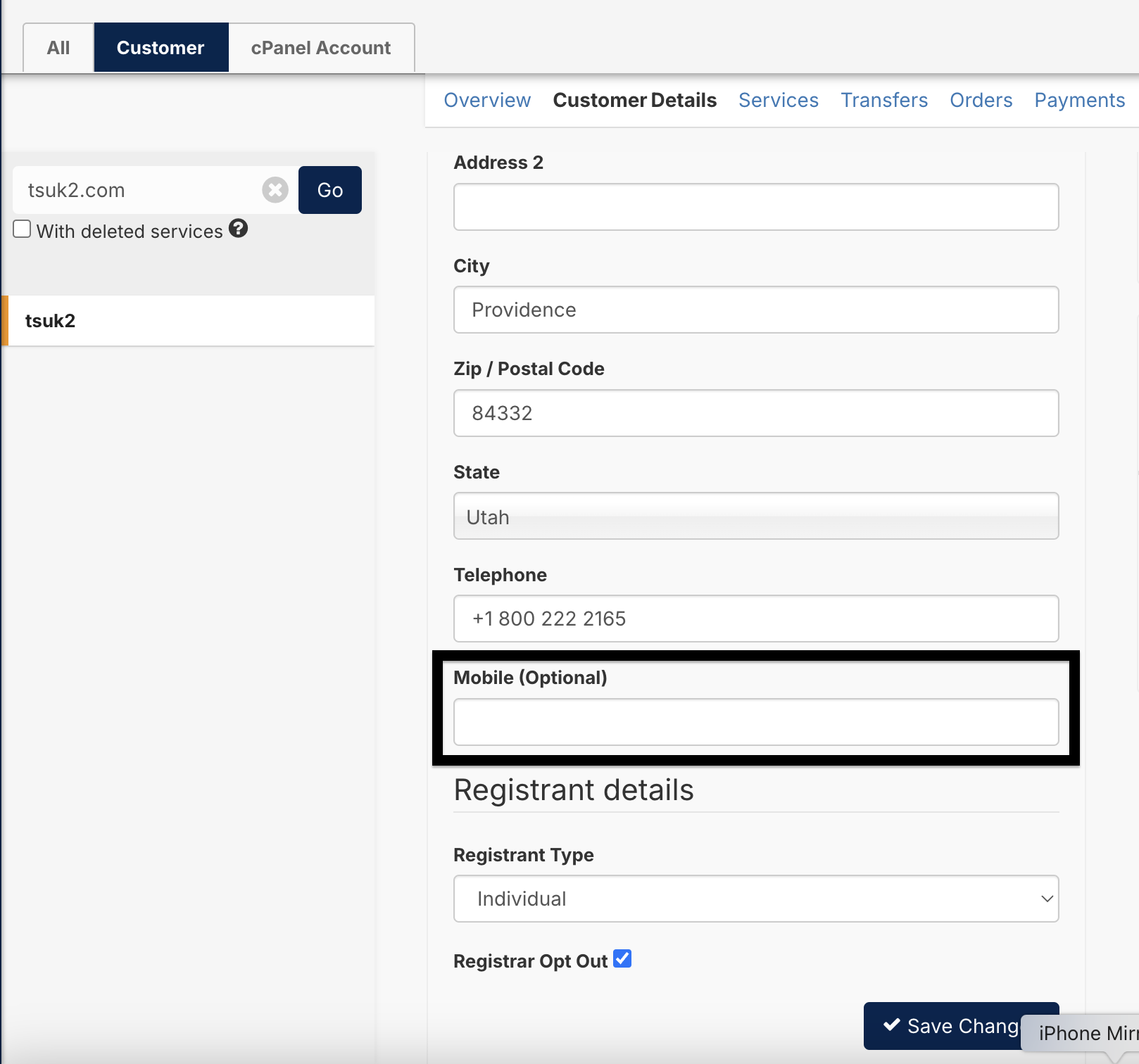
This guide will detail how to use the new SMS feature to get username reminders, reset their CHI password and also receive 2FA codes for logging into CHI. Please be aware, for the SMS feature to work you must have a 'Mobile' number added to the field shown below in CHI:
Username Reminder via SMS
- Navigate to https://chi.uk2.net/remind_username and enter in the email address as found in CHI
- Click 'Send Email'
- After roughly 30 seconds, the 'Send SMS' button will turn blue
- Clicking this will then send an SMS to the customer which will include their username
Password Reset via SMS
- Navigate to https://chi.uk2.net/password_reset and enter in the username
- Click 'Send Email'
- After roughly 30 seconds, the 'Send SMS' button will turn blue
- Clicking this will then send an SMS which will include a link to allow them to reset their CHI password
2FA Code via SMS
- It is a requirement for to have 2FA enabled, either via Email or via an authenticator app such as Google Authenticator
- When you login to https://chi.uk2.net and have successfully entered your username and password, you will be asked for a 2FA Code
- If a code is not entered after roughly 30 seconds, more options will come up, such as 'Send SMS' or 'Send Recovery Email'
- 'Send SMS' will send a 2FA code via SMS, and 'Send Recovery Email' will send the 2FA code to the recovery email specified in CHI.
Related Articles
How Do I CancelHow To Push Services To Another Account
How To Update Your Primary / Recovery Email Address In CHI
How To Purchase Additional Email Accounts Or Forwarders
How To Update Card Details In CHI
Can’t Find what you need?
No worries, Our experts are here to help.