
Back to StackCP Hosted Email

3. Once StackCP is open - look for the 'Domain Names' section and click "Manage DNS"
Towards the bottom of the Manage DNS page, you will see 3 inputs to allow you to add new records.
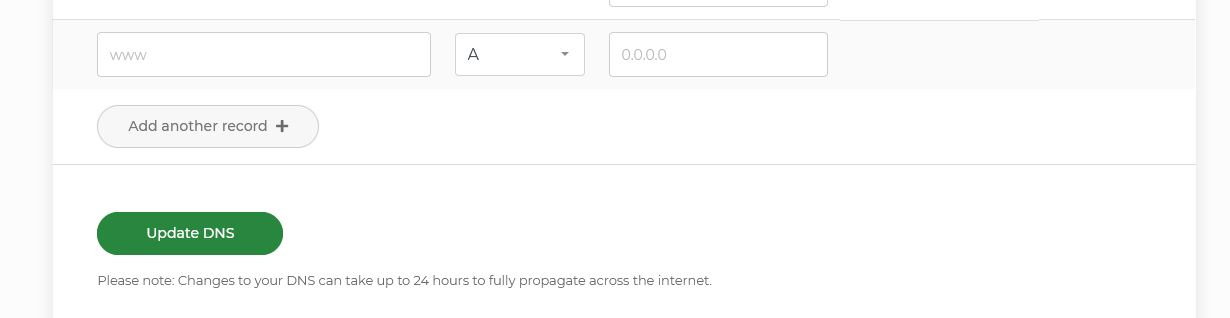
To add it:
5. The page that loads will show the name servers on the domain, and below them, you will find the individual DNS records that are on our name servers for that domain. Locate the section called "TXT Records" and click the "Add New TXT Record' button.
6. In the new window you can enter the following records for our SPF record and click the Save Button.
What is a SPF record and can I add one to my domain name?
Sender Policy Framework (SPF) records help to reduce the chance of your domain being spoofed in
spam messages. It can also increase the deliverability of e-mail to
external providers such as Gmail and Outlook who require authentication for emails.
We maintain an SPF record that is kept up to date with all IP addresses used to send emails from our network. This ensures that any email through our services passes an SPF check.
We maintain an SPF record that is kept up to date with all IP addresses used to send emails from our network. This ensures that any email through our services passes an SPF check.
**Please note that all new orders through us, will by default have our SPF Record added on to it.
You can also add an SPF record manually if our ones are not yet on your domain. You can add the SPF record to the domain from inside the CHI area and you can add it from inside the Stackcp hosting area.
How to add SPF records 'manually' using StackCP :
1. Login to your account at https://chi.uk2.net/
2. Head to 'Shared Hosting' and click the 'Manage StackCP' button.
2. Head to 'Shared Hosting' and click the 'Manage StackCP' button.
3. Once StackCP is open - look for the 'Domain Names' section and click "Manage DNS"
Towards the bottom of the Manage DNS page, you will see 3 inputs to allow you to add new records.
To add it:
- In the first field: Leave the Name field blank
- in the second drop down menu, Select TXT for Type
- In the third field type in: v=spf1 include:spf.stackmail.com a mx -all
3. Click the 'Update DNS' button to save the record.
How to add SPF record 'manually' using CHI :
If your domain name is set to use our name servers, then you can also setup the SPF record from the CHI section.
1. Log in to your CHI account at https://chi.uk2.net
2. Click on the 'Domains' option on the left hand menu
3. In the list of your domains, click the 'Manage' button next to the domain you want add the SPF record onto.
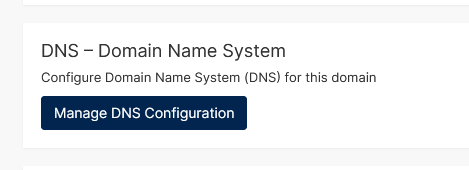
4. On next page click the 'Manage DNS Configuration' button
4. On next page click the 'Manage DNS Configuration' button
5. The page that loads will show the name servers on the domain, and below them, you will find the individual DNS records that are on our name servers for that domain. Locate the section called "TXT Records" and click the "Add New TXT Record' button.
6. In the new window you can enter the following records for our SPF record and click the Save Button.
Name: @
Value: v=spf1 include:spf.stackmail.com a mx -all
TTL: 86400
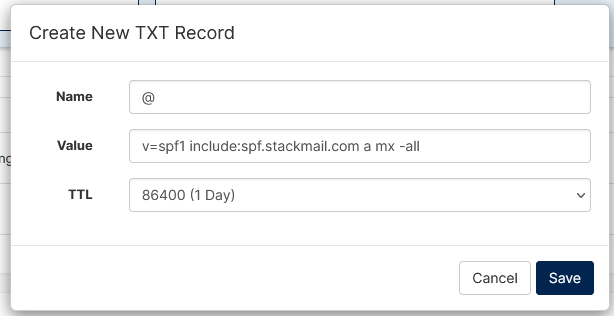
Value: v=spf1 include:spf.stackmail.com a mx -all
TTL: 86400
You can use the same SPF record for all domains that use our mail
services, however, it should be noted that the above record will tell
external providers all of your e-mail should originate from our network.